One-click deployment platforms
Deploy Silex with a single click on managed hosting platforms.
Overview
CapRover provides a simplified deployment interface, handling SSL, updates, and backups through a web dashboard. Support for more platforms is on the roadmap.
CapRover
CapRover is a developer-friendly platform for self-hosting Docker apps on your own server.
Prerequisites
- CapRover instance running (see CapRover docs)
Install from CapRover One-Click Apps
Silex is available as a one-click app in the official CapRover One Click Apps Repository.
- Open your CapRover dashboard at
https://captain.your-domain.com - Go to Apps → Create an app → One-Click Apps
- Search for silex — select silex-platform
- Choose a version tag (see Docker Hub tags for available versions)
- Fill in the configuration fields (see below)
- Click Deploy
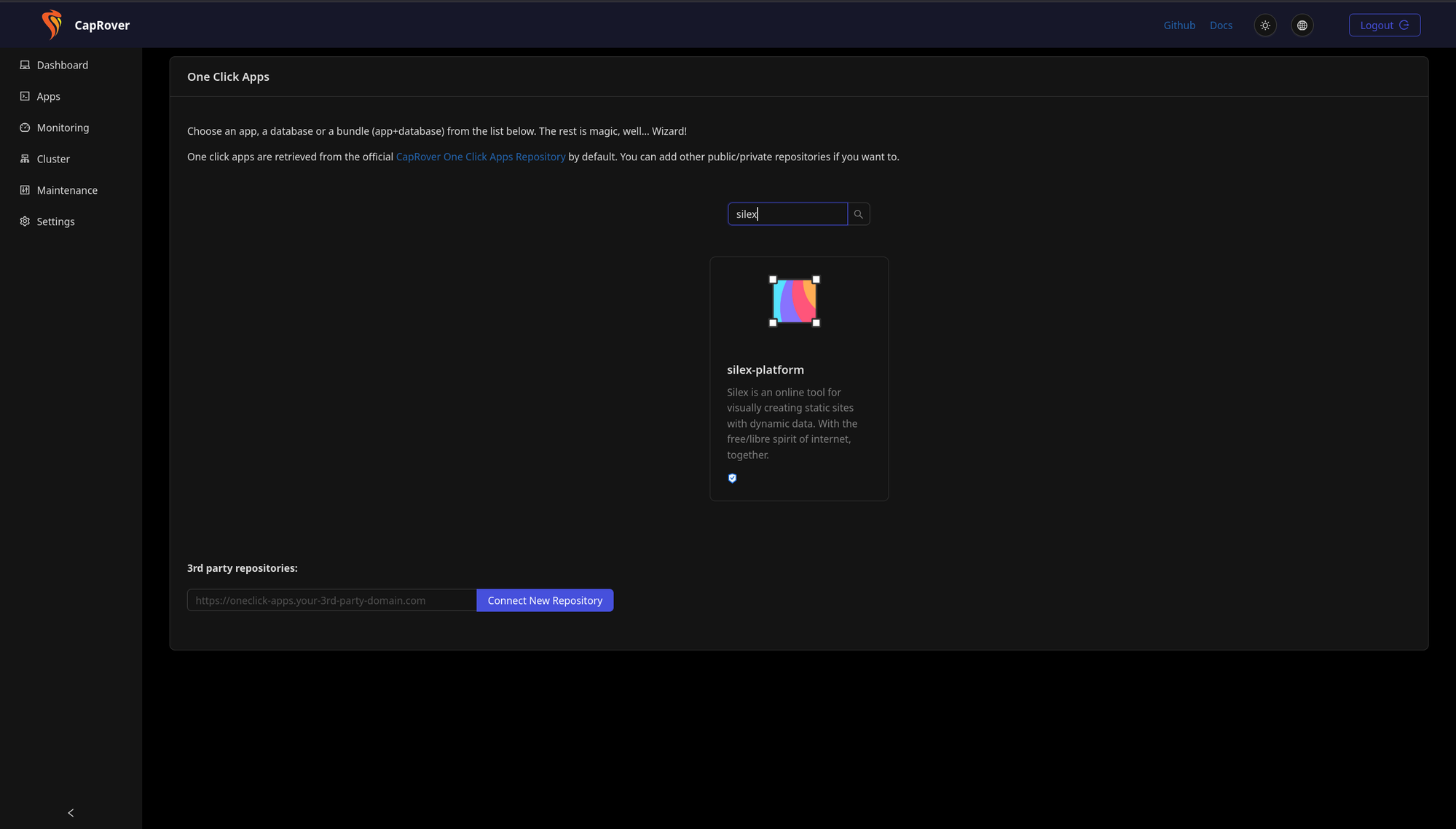
That's it — CapRover pulls the Docker image, configures the app, and sets up SSL automatically.
CapRover configuration fields
The one-click app form asks for:
| Field | Values | Description |
|---|---|---|
STORAGE_CONNECTOR |
gitlab, ftp, gitlab2 (comma-separated, no spaces) |
Where users store their websites |
HOSTING_CONNECTOR |
gitlab, ftp, gitlab2, download (comma-separated, no spaces) |
Where websites get published |
GITLAB_CLIENT_ID |
Your OAuth app ID | For the primary GitLab instance (see GitLab OAuth docs) |
GITLAB_CLIENT_SECRET |
Your OAuth app secret | For the primary GitLab instance |
GITLAB2_DOMAIN |
e.g. https://framagit.org |
Domain of a second GitLab instance (optional) |
GITLAB2_CLIENT_ID |
Your OAuth app ID | For the second GitLab instance (optional) |
GITLAB2_CLIENT_SECRET |
Your OAuth app secret | For the second GitLab instance (optional) |
You can connect up to two GitLab instances — for example, gitlab.com as primary and a self-hosted GitLab or Framagit as secondary.
After deployment
In the CapRover dashboard you can:
- View logs
- Edit environment variables
- Set up SSL (CapRover handles Let's Encrypt automatically)
- Configure persistent volumes for storage
Full self-hosted stack on CapRover
You can host everything on CapRover — all available as one-click apps:
- Silex for visual website design
- GitLab for storage and publishing
- WordPress (or another CMS) as a data source for dynamic content
This gives you a fully self-hosted web publishing stack on your own server. Connect them by setting the environment variables above — just point GITLAB_CLIENT_ID and GITLAB_CLIENT_SECRET to your self-hosted GitLab instance, and configure WordPress as a CMS data source.
See Storage connectors for details on OAuth setup.
YunoHost (coming soon)
YunoHost is a distribution that simplifies server management. YunoHost support for Silex is planned but not yet available — vote for it on the roadmap.
Other platforms
Support for additional one-click deploy platforms (Dokku, Coolify, Sandstorm, etc.) is being discussed on the roadmap. Vote and comment to help prioritize.
Environment variables reference
All platforms require these variables:
| Variable | Example | Purpose |
|---|---|---|
SILEX_SESSION_SECRET |
(random 32+ chars) | Session encryption key; generate a new one for each deployment |
SILEX_URL |
https://silex.example.com | Public URL users visit |
SILEX_PORT |
6805 | Internal port |
STORAGE_CONNECTOR |
gitlab | Storage backend: gitlab, ftp, gitlab2 (comma-separated, no spaces) |
HOSTING_CONNECTOR |
gitlab,download | Publishing backend: gitlab, ftp, gitlab2, download (comma-separated, no spaces) |
Generating SILEX_SESSION_SECRET
Use a strong random key:
GitLab integration example
To enable GitLab storage and publishing:
STORAGE_CONNECTOR=gitlab
HOSTING_CONNECTOR=gitlab,download
GITLAB_CLIENT_ID=your-oauth-app-id
GITLAB_CLIENT_SECRET=your-oauth-app-secret
See Storage connectors for OAuth setup.
Data persistence
Both platforms support persistent volumes for:
- /silex/storage — Website data and assets
- /silex/hosting — Published sites
Data persists across app restarts and updates. Back up regularly through the platform's dashboard.
SSL/HTTPS
Both platforms automatically provision and renew SSL certificates via Let's Encrypt. Your Silex instance is secure out of the box.
Set SILEX_URL to your HTTPS domain:
Troubleshooting
App fails to start
Check logs in the CapRover dashboard: App detail page → Logs.
Common issues:
- SILEX_SESSION_SECRET missing or too short
- Port already in use (choose a different port)
- Storage volume permissions (platform usually handles this)
Can't upload large files
Increase Express limits in environment variables:
SSL certificate issues
All platforms auto-renew certificates. If renewal fails: - Ensure your domain's DNS points to the server - Check platform logs for DNS validation errors - Manual renewal varies by platform; see platform docs
See also
- Docker Compose setup
- Running from Node.js
- Server configuration — Server config API