Collection pages
A collection page is one page that becomes many: one page per blog post, per product, per team member. You design the page once. When you publish, Silex creates one page for each item of a list from your data source.
How it works
A collection page is a normal page with two settings, in the CMS tab of its Page settings (gear icon next to the page in the Pages panel):
- Pagination Data: the list to use, for example
posts. Each item of the list gets its own page. - Permalink: the URL of each page, built from the item, for example
blog/followed by the post'sid.
A blog with 100 posts gives 100 pages.
Setting up a collection page (example: blog)
The field names below (posts, data, id, title, body) come from a test API. Your CMS has its own names. When you click + in an expression, the menu lists the real fields. Pick the closest ones.
Step 1: Create the page
- Open the Pages panel and click + next to Pages
- Name the page, for example
Post, and click Ok
Step 2: Set the Pagination Data
- In the Pages panel, click the gear icon next to the page name. This opens the Page settings. They are not the Element settings (gear icon at the top of the right panel)
- Open the CMS tab
- Under Pagination Data, click + and pick the list, for example
posts, then the field that holds the list if your API wraps it (likenodesordata)
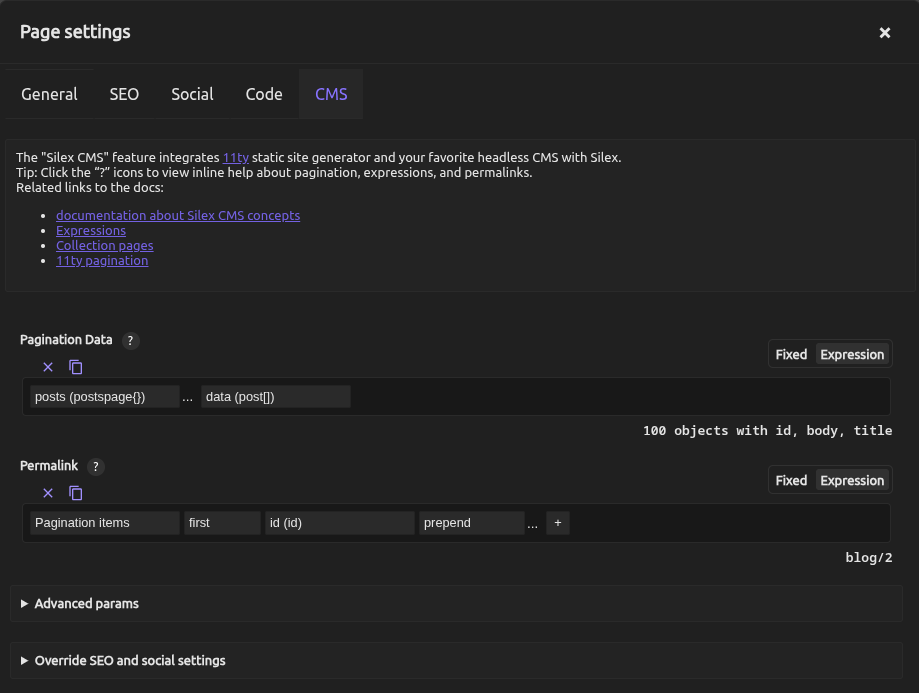
The text below the field says how many items the list has, for example 100 objects with id, body, title.
Step 3: Set the Permalink
- Under Permalink, click + and pick Pagination items (in the group Website's states). Then pick
first, then a field that is different for each item, likeidor a slug - To put the pages in a
blog/path, click + at the end and pickprepend. Click the … next toprepend. In the small window that opens, choose Fixed, typeblog/and click Apply - Click Apply at the bottom of the Page settings window
The text below the field shows the URL of the item shown on the canvas. In the picture below, the canvas shows the second post, so the URL is blog/2.
Step 4: Show the item on the page
- From the Blocks panel, drag a Text onto the page
- Open the Element settings (gear icon)
- In Properties, click Expression next to HTML content
- Click +, pick Pagination items (in the group Website's states), then
first, thentitle - Do the same with a second Text, and pick
bodyat the end
Pagination items is a list, which is why you pick first before the field: with one item per page, it holds only the current item.
Step 5: Check each item in the editor
Below the page list, the Pages panel now has a Collection Pages list, with one entry per item, named after its URL (Blog/1, Blog/2…). Click an entry: the canvas shows the page with that item.
Step 6: Publish
Publish your site. Each item gets its own page: with the settings above, post 1 is at /blog/1/, post 2 at /blog/2/, and so on.
If you leave Permalink empty, the URLs use the page name and a number. The first item is at /post/, the second at /post/1/, the third at /post/2/.
Good to know
- The pages are static. They are created at publish time. When you add a post in your CMS, publish again to get its page.
- Pagination Data takes only a list. Unlike Permalink, it has no filters: you cannot sort the list or keep only some items there.
- The Pages panel has no folders. The path of the URLs (
blog/,products/) comes from the Permalink. - Size, under Advanced params, is the number of items per page. Leave it at
1for one page per item.
Learn more
- Expressions: building the expressions used above
- Binding data: showing data in elements
- Publishing: the full publish pipeline
- Developer: build awesome config: the build that creates the pages, powered by Eleventy
Quiz
Q1: What does a collection page do?
- A) Creates a page that fetches data each time a visitor opens it
- B) Generates one static HTML page per item in your data
- C) Shows a list of all items (like a blog archive)
Answer
B) Generates one static HTML page per item in your data: the pages are created at publish time. Nothing is fetched when a visitor opens them.
Q2: Where do you set the list that gives one page per item?
- A) In the Element settings (gear icon), in Loop Data
- B) In the Page settings (gear icon next to the page name in the Pages panel), CMS tab, Pagination Data
- C) In Site Settings
Answer
B): Pagination Data is a page setting. Loop Data repeats an element on one page, it does not create pages.
Q3: On the collection page, how does a Text show the title of the current post?
- A) HTML content =
posts,data,title - B) HTML content = Pagination items,
first,title - C) HTML content = Loop item,
title
Answer
B): Pagination items holds the current item. posts, data, title would read from the whole list, not from the current post.
Q4: Your Permalink is Pagination items, first, id, then prepend blog/. What is the URL of the post whose id is 7?
- A)
/blog/7/ - B)
/post/7/ - C)
/7/blog/
Answer
A) /blog/7/: prepend adds blog/ before the id.
Q5: After publishing, you add a new post in your CMS. What happens?
- A) The new post page appears automatically on your site
- B) You must publish again to generate a page for the new post
- C) The new post appears as a dynamic page (not static)
Answer
B) You must publish again: collection pages are generated at publish time.