Expressions
An expression is a sequence of tokens that evaluates to a single value — the content to display, the URL to use, or a condition to test.
Think of an expression as a recipe: each ingredient (token) transforms the data one step further. You read it left to right. posts → first → title means "get posts, take the first, extract the title."
Understanding tokens
There are four types of tokens — the building blocks of expressions.
Property tokens access a field from your GraphQL API. Examples: posts, title, featured_image, author_name. Every property token asks the API for a specific piece of data.
Filter tokens transform data using Liquid filters. Examples: upcase (make text uppercase), where (filter a list), first (get the first item). Filters are always applied to the output of the previous token.
State tokens reference a state created on an element that contains this one. If a container has a state called post, the elements inside it can use it to reuse its data.
Fixed tokens are hard-coded values you enter yourself — a string, number, or boolean. Useful for fallback values or static content.
How tokens chain together
Expressions work left to right. Each token takes the output from the previous token as input.
Example 1: Simple property chain
"Get the author object, then extract the name field."Example 2: Property + filter
"Get the title, then apply the upcase filter to make it all capitals."Example 3: Complex chain
"Get posts, filter to only those where category equals 'news', take the first one, and extract its title."This chain has four tokens:
- Property:
posts— fetch all posts - Filter:
where— narrow down by category - Filter:
first— pick the first result - Property:
title— get the title field
Token input and output
Every token has a type of data it expects and a type it produces.
A property token that returns a list of posts has output type "list of posts". If you then apply the first filter, it outputs "one post" (an object). Then you can use the title property, which outputs "string".
When you're building an expression in the editor, Silex shows you which tokens are valid — it won't let you apply a filter designed for strings to a number, for example.
Fixed values
Sometimes you need to enter a static value — a piece of text, a number, or a URL slug.
A fixed token is just text or a number you type in. In an expression like:
The "published" is a fixed token — a hard-coded string. It's not coming from your API; you're telling Silex "match the status field against this exact string."
Where expressions go
You build expressions in the Element settings (gear icon at the top of the right panel):
- Properties: HTML content (the text inside the element), Visibility Condition (show or hide the element, see Conditions) and Loop Data (repeat the element, see Loops and lists)
- Attributes: HTML attributes like
href,srcoralt - States: values you name yourself, shared with the elements inside
Building your first expression
Click Expression next to a field, then +: the menu shows the tokens you can add. Start with a property (something from your API), then add filters to shape the data.
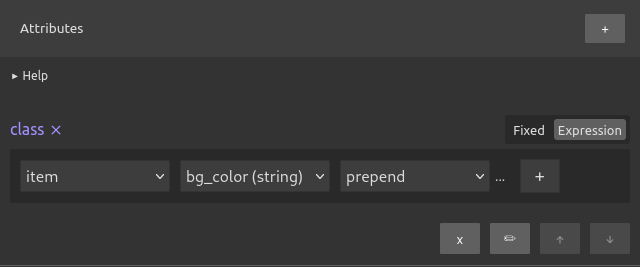
If you want to display the title of the first blog post, your expression is:
- Select the
postsproperty. If your API wraps the list, also pick the field that holds it, likenodesordata - Add the
firstfilter - Add the
titleproperty - The result:
posts → first → title, which outputs a string (the title)
Put it in the HTML content of a Text and the title appears on the canvas.
Learn more
- Binding data — practical steps to create and use expressions in the editor
- Loops and lists — how the Loop Data field repeats an element for each item of a list
- Conditions — visibility operators and how to show/hide based on data
- Filters — complete reference of all available Liquid filters
- WordPress setup — understanding the data structure you'll be working with
Quiz
Q1: You want to display the uppercase version of the first post's title. What tokens do you need?
- A)
posts → first → title → upcase - B)
posts → first → upcase → title - C)
upcase → posts → first → title
Answer
A) posts → first → title → upcase — You get the posts, take the first one, extract its title (a string), then apply upcase to make it uppercase. Filter tokens must come after the data they transform.
Q2: What is a fixed token?
- A) A token that never changes
- B) A hard-coded value you type in (not from your API)
- C) A token that can only be used once per expression
Answer
B) A hard-coded value you type in (not from your API) — Fixed tokens are literal strings, numbers, or booleans that you enter directly, as opposed to property tokens that fetch data from your GraphQL API.
Q3: In the expression posts → where (status = "published") → first → title, what is "published"?
- A) A property token
- B) A filter token
- C) A fixed token
Answer
C) A fixed token — You're comparing the status field against the exact string "published". That's a literal value you're entering, not fetching from the API.
Q4: Why does Silex prevent you from applying a string filter to a number?
- A) It's a technical limitation
- B) The filter wouldn't make sense or would produce an error
- C) Silex wants to make the UI simpler
Answer
B) The filter wouldn't make sense or would produce an error — Filters are designed for specific data types. An uppercase filter expects text; applying it to a number doesn't make semantic sense and would fail.
Q5: You want several elements inside a Container to reuse the first post. Where do you build posts → first?
- A) In a State of the Container
- B) In the Visibility Condition of the Container
- C) In a fixed token
Answer
A) In a State of the Container — A state is shared with the elements inside. In their + menu, they find it in the group named after the Container.